-
Shop
- Advanced Technologies
- AI Skills for Creators & Freelancers
- AI Client Management
- AI Ethics
- AI Mindset
- AI Tools & Prompts
- AI Writing & Content Creation
- Audio, Voice & Music
- Design & Visual Creation
- Email, Messaging & Communication
- Freelancing & Business
- Marketing, Ads & Conversion
- Productivity, Workflow & Automation
- SEO & Search Optimization
- Social Media Content & Growth
- Strategy, Planning & Analytics
- Video Creation & Editing
- AI Skills Mastery 2026 Collection
- Bathroom
- Best-Sellers
- Car Accessories
- Confidence
- Dating & Social Skills
- Digital Resources
- Easter Products
- Education & Learning
- Family & Parenting
- Fashion
- Fashion Accessories
- Furniture
- Gadgets
- Health & Beauty
- Health & Wellness
- Home & Garden
- Home Electronics
- Home Supplies
- Jewelry
- Kids & Babies
- Kitchen
- Lighting
- Patio, Lawn & Garden
- Personal Growth
- Pet Care
- Pet Supplies
- Pets
- Shoes
- Smart Home Living Guides
- Sport & Outdoors
- Stress Relief & Relaxation
- Super Deals
- TikTok Growth & Monetization Mastery
- Travel
- Travel & Adventure
- Wealth
- Wellness
Can a 100W USB-C Cable Fast Charge a MacBook?
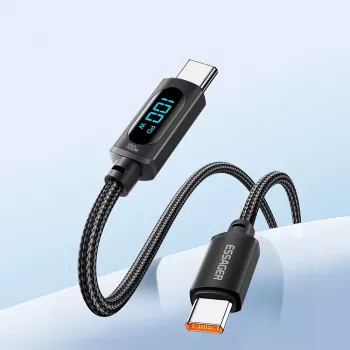
Will a 100W USB-C to USB-C cable fast charge a MacBook Pro or MacBook Air?
It can, but only when the whole charging setup supports it. A 100W USB-C to USB-C cable is capable of carrying up to 100W (typically 20V/5A) when it’s a proper USB-C Power Delivery (PD) cable with an E-Marker chip. Pair that with a compatible USB-C PD wall charger, and many MacBook Pro and MacBook Air models will fast charge normally.
What “100W cable” actually guarantees
A 100W rating mainly indicates the cable can safely handle higher current (5A) required for 100W charging. It doesn’t automatically make charging “fast” if your power adapter, the USB-C port you plug into, or the MacBook itself negotiates a lower PD profile (for example 60W or 30W). The device and charger must agree on voltage/current over USB-C PD.
MacBook Air vs. MacBook Pro expectations
For many MacBook Air setups, a 100W cable is more than enough—most Air models draw well under 100W, so you’ll typically be limited by the charger’s wattage rather than the cable. For MacBook Pro, fast charging depends heavily on the model and adapter: a higher-wattage USB-C PD charger (often 67W, 96W, or 140W with USB-C to MagSafe on some models) may be needed to reach peak charging speed. A 100W USB-C to USB-C cable can still fast charge many Pro models, but it won’t exceed 100W, and some newer Pro fast-charge scenarios may require a different cable/connector to hit maximum rates.
How to avoid slow charging or disconnects
Use a reputable, PD-rated 100W (5A) USB-C to USB-C cable, and match it with a USB-C PD charger that meets or exceeds your MacBook’s recommended wattage. If you see “Not Charging” or very slow charging, the most common causes are a low-watt charger, a non-PD port (like some USB-C hubs/monitors), or a cable that’s not truly 5A/E-Marked.
For a deeper breakdown of what a 100W USB-C to USB-C cable supports (including PD details and what to look for), visit this 100W USB-C cable guide.
FAQ
Does a 100W USB-C cable need an E-Marker chip?
Yes. USB-C cables that support 5A (needed for 100W) should be E-Marked so the charger and laptop can safely negotiate higher current without overheating or instability.
Recommended for you


Was this article helpful?
Yes
No









Leave a comment