-
Shop
- Advanced Technologies
- AI Skills for Creators & Freelancers
- AI Client Management
- AI Ethics
- AI Mindset
- AI Tools & Prompts
- AI Writing & Content Creation
- Audio, Voice & Music
- Design & Visual Creation
- Email, Messaging & Communication
- Freelancing & Business
- Marketing, Ads & Conversion
- Productivity, Workflow & Automation
- SEO & Search Optimization
- Social Media Content & Growth
- Strategy, Planning & Analytics
- Video Creation & Editing
- AI Skills Mastery 2026 Collection
- Bathroom
- Best-Sellers
- Car Accessories
- Confidence
- Dating & Social Skills
- Digital Resources
- Easter Products
- Education & Learning
- Family & Parenting
- Fashion
- Fashion Accessories
- Furniture
- Gadgets
- Health & Beauty
- Health & Wellness
- Home & Garden
- Home Electronics
- Home Supplies
- Jewelry
- Kids & Babies
- Kitchen
- Lighting
- Patio, Lawn & Garden
- Personal Growth
- Pet Care
- Pet Supplies
- Pets
- Shoes
- Smart Home Living Guides
- Sport & Outdoors
- Stress Relief & Relaxation
- Super Deals
- TikTok Growth & Monetization Mastery
- Travel
- Travel & Adventure
- Wealth
- Wellness
100W LED USB-C to USB-C Cable: PD & QC3.0 Guide
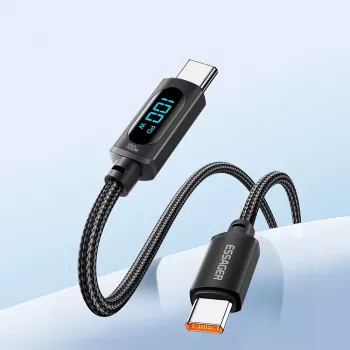
LED USB-C to USB-C Fast Charging Cable (100W) with PD & QC3.0 for MacBook and Samsung
A USB-C to USB-C cable can look simple, but charging speed, device compatibility, durability, and safety depend on the standards it supports. This LED-equipped cable is designed for fast charging up to 100W and everyday use with USB Power Delivery and QC3.0-compatible devices, including MacBook and many Samsung phones and tablets.
What This Cable Is Made For
- Fast charging for USB-C laptops and phones that support USB Power Delivery (PD).
- Higher-wattage charging up to 100W for compatible chargers and devices (useful for many MacBook models and other USB-C laptops).
- Everyday charging and syncing for USB-C devices such as Samsung Galaxy phones, tablets, and accessories.
- LED indicator design for quick visibility in dark rooms, cars, or travel setups.
Charging Standards Explained: PD and QC3.0
Fast charging isn’t just about the cable—it’s the whole chain: charger, cable, and device. When everything speaks the same “language,” charging becomes both faster and more predictable.
- USB Power Delivery (USB PD) is the most common fast-charging standard for USB-C devices. It negotiates voltage and current so the charger can deliver more power safely when both the charger and device support it. For background on the standard, see the official USB PD overview.
- 100W capability usually points to support for higher-power USB PD profiles. Real-world speed still depends on the charger’s maximum output and the device’s maximum accepted wattage.
- QC3.0 (Quick Charge) is part of Qualcomm’s fast-charging family and is often seen on older or mixed USB-A/USB-C adapters. Some setups advertise “QC” broadly, but that label alone doesn’t guarantee 100W laptop charging. (Reference: Qualcomm Quick Charge.)
- Best pairing for laptops: a quality USB-C PD wall charger plus a PD-capable laptop. A PD cable helps keep the experience consistent across different chargers and devices.
Compatibility Guide for MacBook, Samsung, and Other USB-C Devices
MacBook and other USB-C laptops
This cable works for charging and power delivery when used with a USB-C PD charger. Charging speed varies by model (for example, Air vs. Pro) and by charger wattage. A 100W-capable cable is especially useful when a laptop can draw 65W, 90W, or close to 100W under load.
Samsung Galaxy phones and tablets
The cable supports USB-C charging for Galaxy devices. Fast charging depends on whether the phone/tablet supports PD/PPS (or another fast-charge mode) and whether the charger supports the same standard. If the charger is basic, the phone will still charge—just at a more standard rate.
Other USB-C gear
It’s also a practical fit for USB-C iPad models, Nintendo Switch (use a reputable PD charger), USB-C power banks, earbuds, handheld gaming devices, and many Bluetooth accessories.
USB-C to USB-C reminder
This is a USB-C to USB-C cable, so it requires a USB-C charger port. It won’t plug into a USB-A charger without an adapter, and adapters can reduce fast-charging consistency.
Power and Performance: What “100W” Means in Real Use
The “100W” rating means the cable is intended to handle up to 20V/5A when paired with compatible USB-C PD hardware. That doesn’t mean every device will charge at 100W—devices only draw what they request, and phones typically pull far less than laptops.
| Device type | Common charger wattage range | What to expect with a 100W-capable USB-C to USB-C cable |
|---|---|---|
| USB-C laptop (MacBook-class) | 45W–100W PD | Stable laptop charging; fastest rates require a matching high-watt PD charger |
| Samsung phone (USB-C) | 18W–45W (PD/PPS on supported chargers) | Fast charging when device and charger support it; otherwise standard USB-C charging |
| Tablet (USB-C) | 18W–45W PD | Faster charging than basic 5V chargers when using PD-capable adapters |
| Power bank (USB-C PD in/out) | 18W–100W PD | Efficient charging and recharging when PD is supported on both ends |
LED Indicator: Practical Benefits and Things to Know
Build, Durability, and Everyday Handling
Safety and Device Protection
- Avoid daisy-chaining adapters and extensions for laptop-class charging; extra connections can add resistance and instability.
- If charging becomes unusually hot, disconnect and inspect the cable ends and device port for debris or damage.
- For deeper technical documentation on USB-C, the USB-IF maintains specification resources at USB Type-C specification resources.
Quick Setup Tips for Best Speed
Product Option
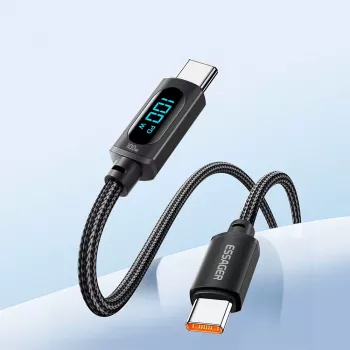
LED USB C to USB C Fast Charging Cable 100W PD QC3.0 for MacBook & Samsung is a budget-friendly pick for daily charging setups, combining high-power capability with an LED design that’s easy to spot in low light.
Other In-Stock Picks for Everyday Use
- Universal Car Steering Wheel Phone Mount for Safe Navigation for hands-free viewing during charging in the car.
- Triple-Sided Ultra-Fine Soft Bristle Toothbrush for Enhanced Oral Health as a compact travel essential to keep in the same kit as your charger and cable.
FAQ
Will this cable fast charge a MacBook at full speed?
It can support high-watt charging up to 100W, but full speed depends on the MacBook model and using a compatible USB-C PD charger with sufficient wattage.
Does a 100W USB-C cable make a phone charge faster?
Only if the phone and charger support a faster charging mode. Most phones draw far less than 100W and will charge at their negotiated maximum.
Is the LED always on?
LED behavior depends on the cable design. Many LED cables illuminate when connected to power, while some may change brightness based on charging state or power flow.
Recommended for you

Was this article helpful?
Yes
No









Leave a comment