-
Shop
- Advanced Technologies
- AI Skills for Creators & Freelancers
- AI Client Management
- AI Ethics
- AI Mindset
- AI Tools & Prompts
- AI Writing & Content Creation
- Audio, Voice & Music
- Design & Visual Creation
- Email, Messaging & Communication
- Freelancing & Business
- Marketing, Ads & Conversion
- Productivity, Workflow & Automation
- SEO & Search Optimization
- Social Media Content & Growth
- Strategy, Planning & Analytics
- Video Creation & Editing
- AI Skills Mastery 2026 Collection
- Bathroom
- Best-Sellers
- Car Accessories
- Confidence
- Dating & Social Skills
- Digital Resources
- Easter Products
- Education & Learning
- Family & Parenting
- Fashion
- Fashion Accessories
- Furniture
- Gadgets
- Health & Beauty
- Health & Wellness
- Home & Garden
- Home Electronics
- Home Supplies
- Jewelry
- Kids & Babies
- Kitchen
- Lighting
- Patio, Lawn & Garden
- Personal Growth
- Pet Care
- Pet Supplies
- Pets
- Shoes
- Smart Home Living Guides
- Sport & Outdoors
- Stress Relief & Relaxation
- Super Deals
- TikTok Growth & Monetization Mastery
- Travel
- Travel & Adventure
- Wealth
- Wellness
Wireless 98% Hot-Swap RGB Mechanical Keyboard (White)
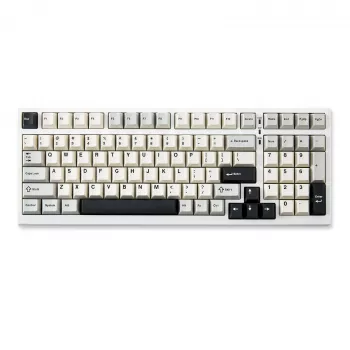
Wireless 98% Mechanical Gaming Keyboard with Hot-Swappable Switches and RGB Backlight (White)
A 98% layout keyboard hits a sweet spot: it keeps your desk feeling open while preserving the near-full set of keys many people rely on every day. For gaming setups that also handle work, school, and general typing, that balance matters. Add wireless flexibility, hot-swappable switches for easy personalization, and RGB lighting for visibility and flair, and you get a board that fits players who want performance without committing to an oversized full-size keyboard.
What a 98% layout changes day to day
The biggest difference with a 98% keyboard is efficiency: most of the keys you expect are still there, but the overall footprint trims away wasted spacing.
- Keeps a compact footprint while retaining a number pad for spreadsheets, macros, and MMO keybinds.
- Reduces mouse reach compared with full-size boards, helping maintain a centered posture during long sessions.
- Often clusters navigation keys more tightly; expect a short adjustment period for Insert/Delete/Home/End placement.
- Works well for mixed use: gaming, coding, and office tasks without giving up the numpad.
If you regularly switch between FPS games and number-heavy tasks (budgets, inventory tracking, or data entry), the 98% layout can feel like a productivity upgrade that still respects your desk space.
Wireless connectivity for gaming and everyday use
Wireless keyboards aren’t just about looks—they can make a setup more flexible for different seating positions, cleaner cable management, and quick laptop docking.
- Look for stable wireless performance that stays responsive during fast inputs and crowded RF environments.
- Confirm charging and play-while-charging behavior if the keyboard is used for long sessions.
- Consider multi-device switching if the keyboard is shared between a PC and a laptop or tablet.
- Keep a plan for firmware/software access if lighting and key functions require configuration.
For context on how wireless devices standardize communication, the Bluetooth Core Specification is a helpful reference. For wired fallback behavior and key reporting conventions, the USB HID Usage Tables is the authoritative baseline many devices follow.
Hot-swappable switches: customization without soldering
Hot-swap support is one of the most practical features a mechanical keyboard can have, especially for people who want to refine feel over time.
- Hot-swap sockets allow replacing switches in minutes, enabling a tailored feel for WASD, spacebar, or numpad keys.
- Mix-and-match switch types: lighter for rapid inputs, heavier for accuracy, quieter options for shared spaces.
- Check switch compatibility (commonly MX-style) before buying replacements, and avoid forcing mismatched pins.
- Keep a basic toolkit: switch puller, keycap puller, and a small brush for debris around sockets.
Common switch feel categories (quick reference)
| Type | Feel | Typical use cases | Noise level |
|---|---|---|---|
| Linear | Smooth press with no bump | FPS movement, rapid double-taps, consistent key feel | Low to medium (depends on housing and keycaps) |
| Tactile | Noticeable bump at actuation | Typing accuracy, mixed gaming and writing | Medium |
| Clicky | Tactile bump with audible click | Users who want strong feedback | High |
RGB backlighting: function first, then style
RGB is easy to treat as purely aesthetic, but it’s also genuinely useful—especially if you play in a dim room or need to find less-used keys quickly.
- Per-key or zone lighting improves visibility in dim rooms and helps highlight key clusters for specific games.
- Prioritize readable legends and even light diffusion; harsh hotspots can reduce clarity.
- If using wireless frequently, set brightness and effects with battery life in mind.
- Create practical profiles: one for gaming (WASD, modifiers), one for work (function row, numpad, shortcuts).
A simple approach that works well is keeping a bright, high-contrast profile while plugged in, then switching to a dimmer static color when running on battery.
Keycaps, stabilizers, and sound feel
Two keyboards with identical switches can sound and feel surprisingly different. That difference often comes down to stabilizers, keycaps, and overall tuning.
- Stabilized keys (spacebar, Enter, Shift, Backspace, numpad 0) influence perceived quality more than most single keys.
- A well-tuned stabilizer reduces rattle and makes long keys feel consistent across the board.
- Keycap material affects tone and durability; thicker caps usually sound deeper and feel more solid.
- Simple upgrades (switch swap on a few keys, minor stabilizer tuning) can make a bigger difference than a full rebuild.
If a board feels “almost right,” a targeted change—like swapping only your most-used keys or reducing rattle on the spacebar—often delivers the biggest payoff for the least effort.
Quick spec checklist before buying
Product spotlight: Wireless 98% Mechanical Gaming Keyboard (White)
At-a-glance details
| Item | Details |
|---|---|
| Name | Wireless 98% Mechanical Gaming Keyboard – Hot Swappable, RGB Backlit, White |
| Price | $113.32 USD |
| Availability | In stock |
| Product page | View product |
More in-stock picks
- Armani Exchange Men’s Sneakers
- Universal Car Steering Wheel Phone Mount for Safe Navigation
- Triple-Sided Ultra-Fine Soft Bristle Toothbrush for Enhanced Oral Health
FAQ
What does “hot-swappable” mean on a mechanical keyboard?
Hot-swappable means you can remove and replace switches without soldering. Most hot-swap boards use MX-style switch compatibility; use a switch puller and power the keyboard off before swapping to avoid damage.
Is a 98% keyboard good for gaming if it includes a number pad?
Yes—98% layouts usually shorten mouse reach compared with full-size boards while keeping numpad utility for games and productivity. The main tradeoff is a brief adjustment to tighter navigation key placement.
Does RGB backlighting drain the battery quickly on wireless keyboards?
RGB lighting typically increases power draw, especially at high brightness or with animated effects. Lower brightness, choose static colors, and use sleep timers or separate “wireless” lighting profiles to extend battery life.
Recommended for you
Was this article helpful?
Yes
No









Leave a comment