-
Shop
- Advanced Technologies
- AI Skills for Creators & Freelancers
- AI Client Management
- AI Ethics
- AI Mindset
- AI Tools & Prompts
- AI Writing & Content Creation
- Audio, Voice & Music
- Design & Visual Creation
- Email, Messaging & Communication
- Freelancing & Business
- Marketing, Ads & Conversion
- Productivity, Workflow & Automation
- SEO & Search Optimization
- Social Media Content & Growth
- Strategy, Planning & Analytics
- Video Creation & Editing
- AI Skills Mastery 2026 Collection
- Bathroom
- Best-Sellers
- Car Accessories
- Confidence
- Dating & Social Skills
- Digital Resources
- Easter Products
- Education & Learning
- Family & Parenting
- Fashion
- Fashion Accessories
- Furniture
- Gadgets
- Health & Beauty
- Health & Wellness
- Home & Garden
- Home Electronics
- Home Supplies
- Jewelry
- Kids & Babies
- Kitchen
- Lighting
- Patio, Lawn & Garden
- Personal Growth
- Pet Care
- Pet Supplies
- Pets
- Shoes
- Smart Home Living Guides
- Sport & Outdoors
- Stress Relief & Relaxation
- Super Deals
- TikTok Growth & Monetization Mastery
- Travel
- Travel & Adventure
- Wealth
- Wellness
Ultra-Light 8KHz Wireless Mouse: Setup Tips for Smooth Aim
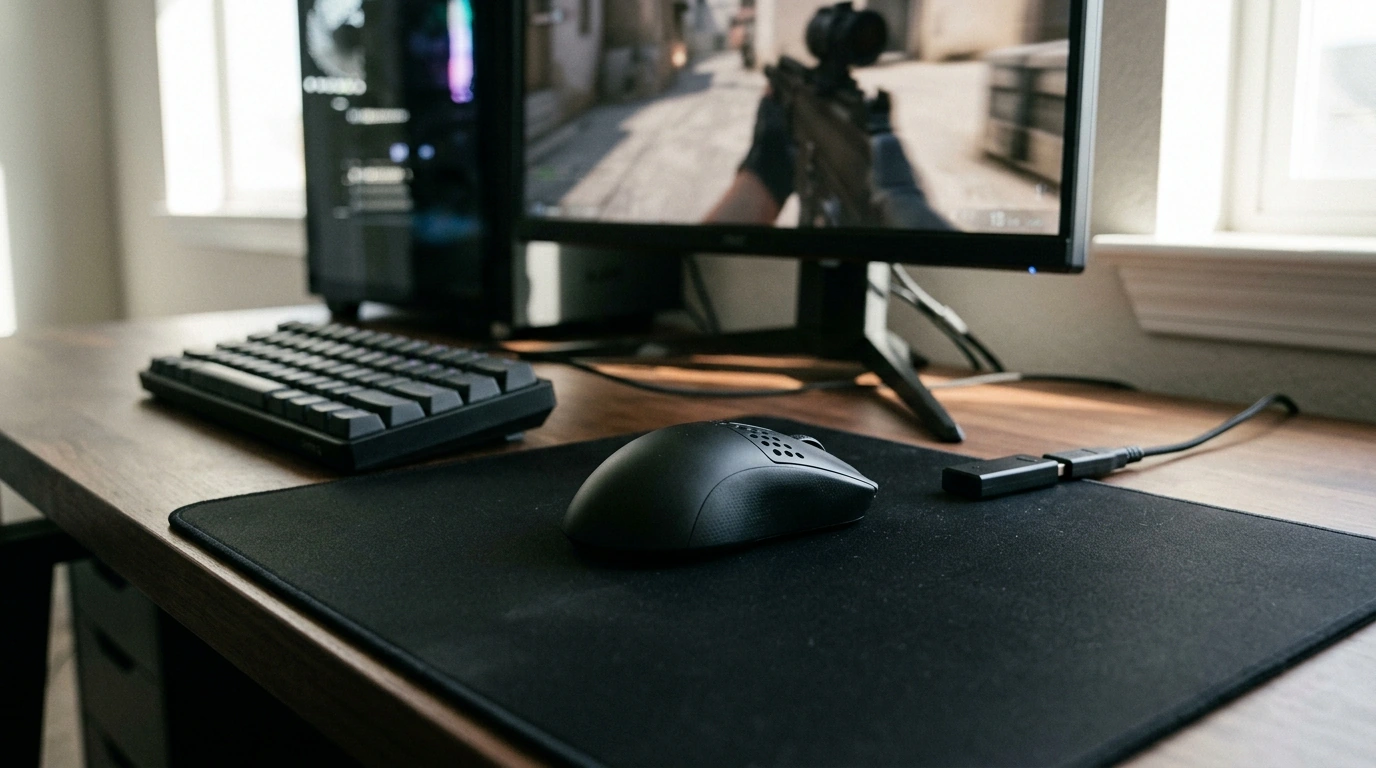
Ultra-Light 8KHz Wireless Gaming Mouse: Speed, Control, and Comfort for Competitive Play
An ultra-light wireless mouse with up to 8KHz polling is built for fast aim corrections, consistent tracking, and reduced fatigue in long sessions. The jump from 1,000Hz to 8,000Hz can make movement reporting feel tighter during high-speed flicks and tiny micro-adjustments, but the best results come from a stable wireless link, solid frame pacing, and a setup that avoids USB/interference pitfalls. For more guidance, see Pwnage Unveils the Trinity CF Gaming Mouse.
If you’re upgrading for ranked play, aim trainers, or high-FPS shooters, the goal isn’t chasing a number—it’s getting smooth, repeatable input that matches your grip and sensitivity. For further reading, see Best Carbon Fiber Gaming Mice for Precisionand Speed.
What 8KHz Polling Changes in Everyday Gameplay
Polling rate is how often your mouse reports its position to your PC. At 8KHz, that’s up to 8,000 updates per second, which can shrink the timing gaps between reports compared with 1,000Hz. In practice, the most noticeable improvements tend to show up during rapid micro-corrections (fine-tuning crosshair placement) and quick flick-to-stop moments where “crispness” and consistency matter.
That said, responsiveness is a chain: the mouse’s microcontroller, the wireless link, the receiver, your USB controller, the operating system’s scheduling, and the game’s frame pacing all play a role. If any part of that chain stumbles—CPU spikes, USB hiccups, unstable FPS—8KHz can feel worse than a lower setting.
Polling Rate Options and Practical Tradeoffs
| Setting | What it tends to feel like | When to use it |
|---|---|---|
| 1000Hz | Widely supported, smooth on most PCs | Default choice for compatibility and battery life |
| 2000Hz | Slightly tighter motion reporting | Good middle ground on mid-range CPUs |
| 4000Hz | More immediate feel in fast aim changes | Competitive play when system stability is solid |
| 8000Hz | Most frequent updates; can feel crisp in micro-corrections | High-FPS setups and systems that remain stable under load |
For a deeper look at how HID devices communicate over USB, see Microsoft’s overview of USB HID (Human Interface Device). If you’re optimizing end-to-end system latency beyond just the mouse, NVIDIA’s overview of NVIDIA Reflex is a helpful reference.
Ultra-Light Design: Why Weight Still Matters
Ultra-light mice aren’t about hype—they reduce the force needed to start, stop, and reverse direction. That can translate into cleaner repeated flicks and less strain in long sessions. Weight distribution matters just as much as the number on the spec sheet: a well-centered balance often feels steadier during tracking, while a front- or back-heavy mouse can make stop control feel inconsistent.
Shape is the other half of “light.” Claw and fingertip grips typically benefit from confident side contours and easy lift-off control, while palm grip users may prefer a little more support even if it adds a few grams. If your hand feels tense or your pinky drags, comfort will cost fewer missed shots than shaving a couple grams.
Wireless Performance: Connection Stability and Receiver Placement
For competitive play, a strong 2.4GHz connection is usually the priority. Bluetooth is convenient for travel or work, but it’s typically higher latency and can feel less consistent in fast shooters.
Receiver placement is a simple upgrade that often solves “mystery” problems: put the receiver close to the mouse using a USB extension or front I/O, and avoid tucking it behind a PC near a cluster of cables. Common interference sources include crowded Wi‑Fi channels, USB 3.0 noise near ports, and dense peripheral setups.
Warning signs include cursor hitching, inconsistent glide, or sudden aim “steps.” In those cases, a stable 2K–4K setup can outperform an unstable 8K setup. Consistency wins.
Sensor, DPI, and Lift-Off Behavior
Modern gaming sensors are rarely limited by raw capability; what matters is tuning, stable tracking, and predictable lift-off behavior. Pick a DPI that matches your display and playstyle—many competitive players stick to a moderate DPI and adjust in-game sensitivity for a comfortable cm/360.
For training and competitive shooters, angle snapping and acceleration are usually best left off unless a specific game setup calls for them. Lift-off distance is especially important for low-sens players who reposition often: a lower lift-off can reduce accidental cursor drift during resets.
Don’t ignore the mousepad. A consistent surface helps reduce jitter and improves stop control, which can make your aim feel more “locked in” than any single spec bump.
Buttons, Switch Feel, and Scroll Control
Battery Life and Charging Habits for High Polling Rates
Recommended Setup for Smooth, Fast Input
In-Stock Picks
- Ultra-Light 8KHz Wireless Gaming Mouse ($70.51) — built for fast corrections, low fatigue, and high polling-rate play when your setup can stay stable.
- Armani Exchange Men’s Sneakers ($107.51) — a comfort upgrade for long sessions, events, or travel where foot support matters as much as desk ergonomics.
FAQ
Is 8KHz always better than 1000Hz for gaming?
No. 8KHz can improve timing granularity and feel, but the benefit depends on stable FPS, CPU headroom, and a clean wireless/USB setup; the best choice is the highest setting that stays consistently smooth.
Does a higher polling rate reduce wireless reliability?
It can be more demanding, but reliability depends mostly on receiver placement, interference, firmware, and USB controller behavior. If you notice hitching, move the receiver closer, try a different USB port, and step down one polling level to confirm stability.
What polling rate should be used if games stutter at 8KHz?
Drop to 4KHz or 2KHz and retest, then check receiver placement and USB port choice. Smooth frame pacing and stable motion usually beat an 8K setting that causes stutter.
Recommended for you
Was this article helpful?
Yes
No









Leave a comment