-
Shop
- Advanced Technologies
- AI Skills for Creators & Freelancers
- AI Client Management
- AI Ethics
- AI Mindset
- AI Tools & Prompts
- AI Writing & Content Creation
- Audio, Voice & Music
- Design & Visual Creation
- Email, Messaging & Communication
- Freelancing & Business
- Marketing, Ads & Conversion
- Productivity, Workflow & Automation
- SEO & Search Optimization
- Social Media Content & Growth
- Strategy, Planning & Analytics
- Video Creation & Editing
- AI Skills Mastery 2026 Collection
- Bathroom
- Best-Sellers
- Car Accessories
- Confidence
- Dating & Social Skills
- Digital Resources
- Easter Products
- Education & Learning
- Family & Parenting
- Fashion
- Fashion Accessories
- Furniture
- Gadgets
- Health & Beauty
- Health & Wellness
- Home & Garden
- Home Electronics
- Home Supplies
- Jewelry
- Kids & Babies
- Kitchen
- Lighting
- Patio, Lawn & Garden
- Personal Growth
- Pet Care
- Pet Supplies
- Pets
- Shoes
- Smart Home Living Guides
- Sport & Outdoors
- Stress Relief & Relaxation
- Super Deals
- TikTok Growth & Monetization Mastery
- Travel
- Travel & Adventure
- Wealth
- Wellness
PS5 & PC Wireless Controller: RGB, Turbo, Hall Triggers
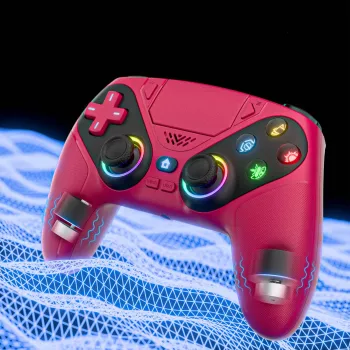
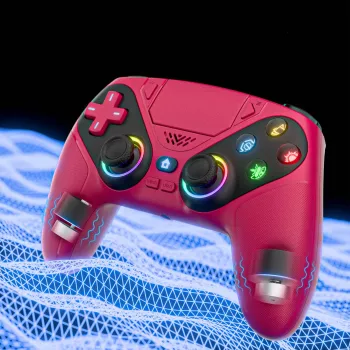
Wireless Game Controller for PS5 & PC with RGB, Turbo Vibration & Hall Triggers
A feature-packed controller can make fast games feel tighter, long sessions more comfortable, and competitive play more consistent. This wireless controller is built for PS5 and PC gaming with adjustable RGB lighting, turbo support, strong vibration feedback, and Hall-effect triggers designed to stay smooth over time. If you switch between console and computer (or you just want a single go-to pad for most of your library), the right blend of responsiveness, pairing stability, and ergonomics matters more than any one headline feature. For more guidance, see AOC PC Controller with Interactive Screen, Hall Effect … – Amazon.com.
What stands out right away
- Wireless play for couch gaming and a cleaner desk setup.
- RGB lighting for quick visual personalization without adding extra accessories.
- Turbo function for rapid repeated inputs in supported games.
- Vibration feedback for impact, recoil, and driving/racing road feel.
- Hall-effect triggers aimed at improving long-term consistency by reducing wear-related input drift.
If those features sound like “nice-to-haves,” the practical payoff is simple: fewer missed inputs in hectic moments, less fatigue during long sessions, and more predictable trigger feel when precision matters. For further reading, see List of game controllers – Wikipedia.
Compatibility: PS5 and PC play cases
Because PS5 and Windows handle controller standards differently depending on the connection method and the game, a quick pre-check can save a lot of troubleshooting. On PS5, you’ll typically get the best experience by using the connection method supported by the console and the specific game you’re playing. On PC, compatibility is often broad, especially when launching games through platforms that include controller configuration options.
Quick compatibility checklist
| Platform | Best use scenario | What to confirm before playing |
|---|---|---|
| PS5 | Couch play and console sessions | Preferred connection method and in-game controller support |
| Windows PC | Steam, launchers, and local co-op | Bluetooth/USB support, gamepad recognized in controller settings |
For living-room PC setups, wireless is especially helpful when you’re playing from a couch or a recliner. If you run into mismatched button prompts on PC, look for in-game input options (or platform-level controller settings) and choose the mode that delivers the correct layout and stable rumble behavior.
Controls and feedback: turbo, vibration, and Hall triggers
This controller’s biggest “feel” upgrades come from how it handles repeated inputs and analog control.
- Turbo: handy for arcade-style titles, action sequences, or repetitive tasks in certain games. Use it responsibly—some competitive modes or online titles restrict rapid-fire behavior.
- Vibration: adds useful feedback in shooters (recoil and impacts), action games (hits and environmental effects), and racing (surface changes and collisions). For long sessions, a moderate vibration level often strikes the best balance between immersion and comfort.
- Hall-effect triggers: built around magnetic sensing rather than purely contact-based sensing, with the goal of more consistent trigger response over time. For a deeper background on the underlying principle, see Encyclopaedia Britannica’s explanation of the Hall effect.
Practical tuning tip: if the controller offers adjustable trigger response, set a more gradual feel for racing (smooth throttle/brake control) and a faster ramp for shooters (quicker full pull when you need it).
RGB lighting: useful beyond aesthetics
RGB can do more than simply look cool—especially in homes where multiple people game on the same system.
- Fast identification: assign a distinct color per player so you grab the right controller instantly.
- Less distraction: lower brightness can help keep focus in dark rooms and reduce visual “noise” during intense moments.
- Battery-minded settings: dimmer, steady colors can be easier on battery life than bright animated effects.
- Profile-style organization: when supported, match colors to game genres (racing vs. RPG) for quick recognition before you even hit Start.
Comfort and handling for long sessions
Setup and pairing tips (PS5 and PC)
For platform-specific pairing guidance, PlayStation’s official steps for pairing controllers on PS5 can be helpful: PlayStation Support: Pair a controller with PS5 consoles. If you’re troubleshooting Bluetooth on Windows, Microsoft’s guide is a solid starting point: Microsoft Support: Fix Bluetooth problems in Windows.
Product snapshot and buying details
If you want a single controller that covers PS5 sessions and PC gaming with extra customization, you can find the current listing here: Wireless Game Controller for PS5 & PC with RGB, Turbo Vibration & Hall Triggers. For a quick check before checkout, Check today’s price and availability.
At-a-glance specs (store listing)
| Item | Detail |
|---|---|
| Product name | Wireless Game Controller for PS5 & PC with RGB, Turbo Vibration & Hall Triggers |
| Price | 50.51 USD |
| Stock status | In stock |
| Primary features | RGB lighting, turbo, vibration, Hall-effect triggers |
| Product page | https://ulorin.com/wireless-game-controller-for-ps5-pc-with-rgb-turbo-vibration-hall-triggers/ |
More in-stock picks on the store
- Universal Car Steering Wheel Phone Mount for Safe Navigation (useful if you game on the go and want a secure navigation setup on travel days).
- Triple-Sided Ultra-Fine Soft Bristle Toothbrush for Enhanced Oral Health (a simple, low-cost add-on item many shoppers bundle with essentials).
Care, maintenance, and longevity
FAQ
Does it work on both PS5 and Windows PC?
It’s designed for PS5 and Windows PC use, but it’s still worth confirming the supported connection modes for each platform. On PC, verify it’s detected in Windows or Steam controller settings before launching a game.
What do Hall-effect triggers change in everyday gameplay?
Hall-effect triggers use magnetic sensing to help keep trigger response consistent over time. That can feel especially beneficial in racing (steady throttle control) and any game where smooth partial pulls matter.
How is turbo best used without causing issues in games?
Use turbo in offline modes or games that allow rapid repeated inputs, such as certain arcade-style titles or repetitive tasks. Disable turbo for competitive modes or titles that restrict rapid-fire behavior.
Recommended for you
Was this article helpful?
Yes
No









Leave a comment