-
Shop
- Advanced Technologies
- AI Skills for Creators & Freelancers
- AI Client Management
- AI Ethics
- AI Mindset
- AI Tools & Prompts
- AI Writing & Content Creation
- Audio, Voice & Music
- Design & Visual Creation
- Email, Messaging & Communication
- Freelancing & Business
- Marketing, Ads & Conversion
- Productivity, Workflow & Automation
- SEO & Search Optimization
- Social Media Content & Growth
- Strategy, Planning & Analytics
- Video Creation & Editing
- AI Skills Mastery 2026 Collection
- Bathroom
- Best-Sellers
- Car Accessories
- Confidence
- Dating & Social Skills
- Digital Resources
- Easter Products
- Education & Learning
- Family & Parenting
- Fashion
- Fashion Accessories
- Furniture
- Gadgets
- Health & Beauty
- Health & Wellness
- Home & Garden
- Home Electronics
- Home Supplies
- Jewelry
- Kids & Babies
- Kitchen
- Lighting
- Patio, Lawn & Garden
- Personal Growth
- Pet Care
- Pet Supplies
- Pets
- Shoes
- Smart Home Living Guides
- Sport & Outdoors
- Stress Relief & Relaxation
- Super Deals
- TikTok Growth & Monetization Mastery
- Travel
- Travel & Adventure
- Wealth
- Wellness
Living Room + Home Office: Layout, Storage & Style Tips
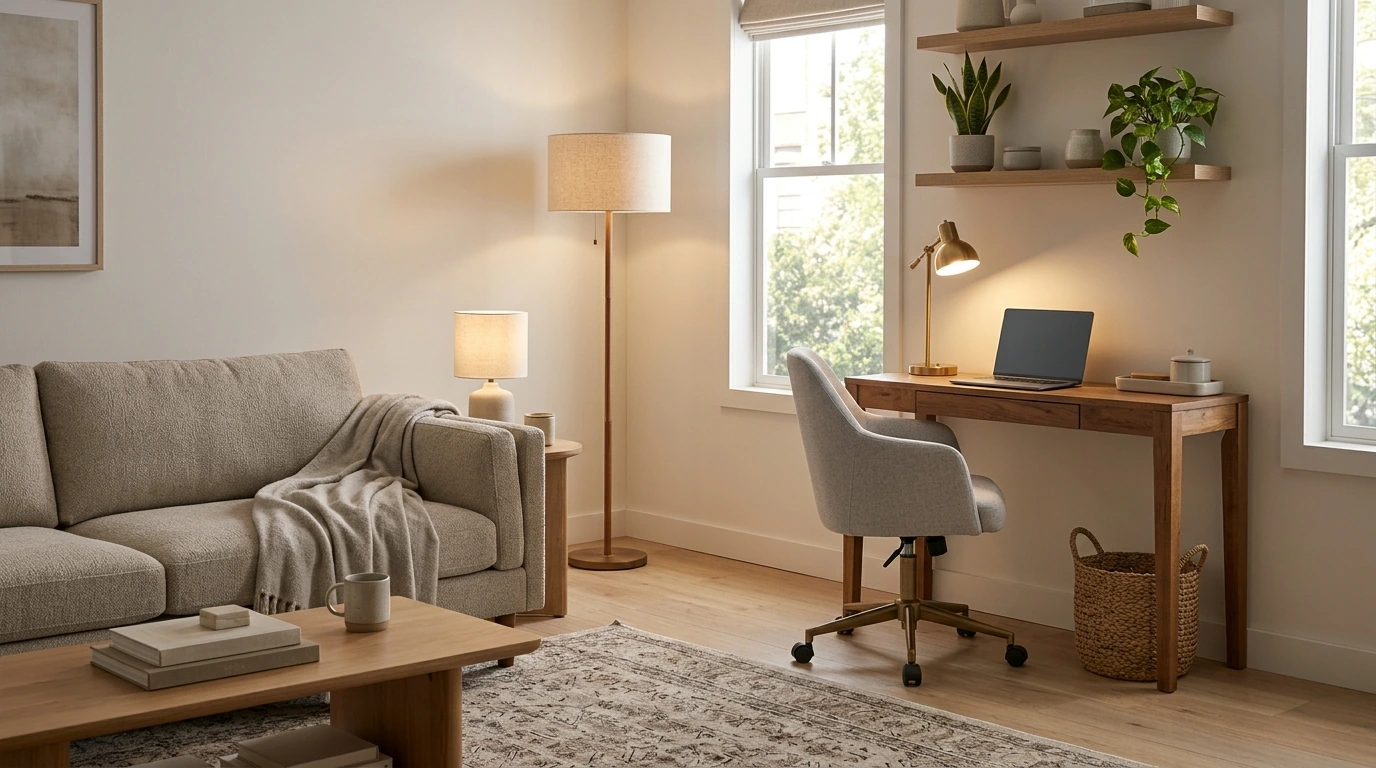
The Balanced Space That Works: A Living Room That Doubles as a Home Office
A living room can feel calm and welcoming while still supporting focused work—when the room is planned in zones, storage is intentional, and the “office” can visually disappear after hours. The goal isn’t to squeeze in a desk at any cost; it’s to create a flexible setup that respects both downtime and deadlines, especially in smaller homes and apartments.
Start with two clear zones (even if the room is small)
Hybrid rooms succeed when each activity has a “home base.” Instead of relying on walls, use placement and a few visual cues to signal what happens where.
- Define a work zone and a lounge zone using placement, not walls—anchor each with one primary piece (desk/work surface and sofa/seating).
- Keep the work zone near power and natural light when possible; reserve the quietest corner for calls and deep focus.
- Use a rug edge, a narrow console, or a floor lamp as a subtle “border” between zones without blocking flow.
- Aim for a clean sightline: from the main entry, the space should read as living room first, office second.
Quick layout options for a hybrid living room
| Layout | Best for | Key pieces | Watch out for |
|---|---|---|---|
| Desk behind sofa | Open-plan rooms | Slim desk or console; task lamp | Cable clutter visible from seating area |
| Corner workstation | Small rooms, rentals | Corner desk; floating shelf; compact chair | Dark corners need better lighting |
| Window-side work zone | Daytime work, plant lovers | Desk facing window; adjustable shade | Screen glare—add sheer + blackout layering |
| Wall-mounted fold-down desk | Tight spaces, minimalist style | Murphy-style desk; wall organizers | Ergonomics—ensure correct height and leg clearance |
Choose a work surface that doesn’t hijack the room
A desk can either blend in like a sideboard—or dominate like a cubicle. The difference comes down to scale, finish, and how quickly you can “reset” it.
- Prioritize depth: 20–24 inches works for a laptop; 24–30 inches supports a monitor and comfortable keyboard distance.
- Pick materials and finishes that match existing furniture (wood tone, black metal, white lacquer) so the desk blends in.
- Consider alternatives: a secretary desk, a narrow writing desk, or a console table can read as décor rather than “office.”
- Plan for a stowable setup: laptop stand, wireless keyboard/mouse, and a lidded tray to clear the surface quickly.
If you want a room-by-room approach to mixing work and living without losing style, The Balanced Space That Works – eBook guide lays out practical hybrid layouts, styling moves, and easy reset routines.
Make comfort non-negotiable: ergonomics in a shared room
When the “office” shares space with your couch, it’s tempting to accept a too-low chair or a screen that’s slightly off. Those small compromises add up fast across weeks of work.
- Chair choice matters most; if an office chair looks out of place, try an upholstered task chair or a chair with a slipcover that matches the room.
- Screen height: top of the display near eye level; add a monitor arm or sturdy riser if needed.
- Use a small footrest or low ottoman to support posture during longer sessions without adding visual bulk.
- Build a “work kit” basket (chargers, headphones, notebook) so daily setup and teardown takes under two minutes.
For workstation basics and positioning guidance, the NIOSH ergonomics resources are a reliable reference for minimizing strain with simple adjustments.
Lighting that shifts from focus to cozy
Lighting is one of the fastest ways to make a dual-purpose room feel intentional. The trick is having “work lighting” that doesn’t ruin the living room mood after hours.
If you regularly end the day with tired eyes, consider habits that reduce screen strain (brightness, breaks, and viewing distance). The American Academy of Ophthalmology guidance on Computer Vision Syndrome is a helpful checklist.
Storage that hides work without feeling like office furniture
Sound and privacy fixes for shared living
For comfort across long work sessions, don’t overlook basics like ventilation and freshness—especially in smaller apartments. The EPA indoor air quality guidance offers practical steps that support a more comfortable space.
And if your “hybrid office” sometimes becomes a mobile office between errands, a small accessory like a Universal Car Steering Wheel Phone Mount for Safe Navigation can help keep navigation visible and hands-free when you’re on the move.
Style the “off-duty” office so the room feels like home
A step-by-step plan for a weekend refresh
FAQ
How can a living room office look tidy when the desk is always visible?
Use closed storage for anything that isn’t used daily, keep cables routed to a single power strip, and maintain one styled tray for essentials. A quick end-of-day reset—close the laptop, stash accessories, and clear paper—keeps the room feeling like a living space.
What’s the best layout for a small living room that needs a workstation?
A corner workstation is often the easiest fit, while a wall-mounted fold-down desk works well when floor space is tight. If your room is open-plan, a slim desk behind the sofa can create a natural divider—just plan cable management and avoid blocking walkways.
How can calls sound better in an open living room?
Add soft materials like a rug and curtains to reduce echo, and use a headset to keep your voice consistent. Position yourself away from hard reflective surfaces and consider subtle sound masking (a fan or white noise) during meetings.
Recommended for you

Was this article helpful?
Yes
No









Leave a comment