-
Shop
- Advanced Technologies
- AI Skills for Creators & Freelancers
- AI Client Management
- AI Ethics
- AI Mindset
- AI Tools & Prompts
- AI Writing & Content Creation
- Audio, Voice & Music
- Design & Visual Creation
- Email, Messaging & Communication
- Freelancing & Business
- Marketing, Ads & Conversion
- Productivity, Workflow & Automation
- SEO & Search Optimization
- Social Media Content & Growth
- Strategy, Planning & Analytics
- Video Creation & Editing
- AI Skills Mastery 2026 Collection
- Bathroom
- Best-Sellers
- Car Accessories
- Confidence
- Dating & Social Skills
- Digital Resources
- Easter Products
- Education & Learning
- Family & Parenting
- Fashion
- Fashion Accessories
- Furniture
- Gadgets
- Health & Beauty
- Health & Wellness
- Home & Garden
- Home Electronics
- Home Supplies
- Jewelry
- Kids & Babies
- Kitchen
- Lighting
- Patio, Lawn & Garden
- Personal Growth
- Pet Care
- Pet Supplies
- Pets
- Shoes
- Smart Home Living Guides
- Sport & Outdoors
- Stress Relief & Relaxation
- Super Deals
- TikTok Growth & Monetization Mastery
- Travel
- Travel & Adventure
- Wealth
- Wellness
Bluetooth Speaker Charging Dock: Fit, Setup & Safety
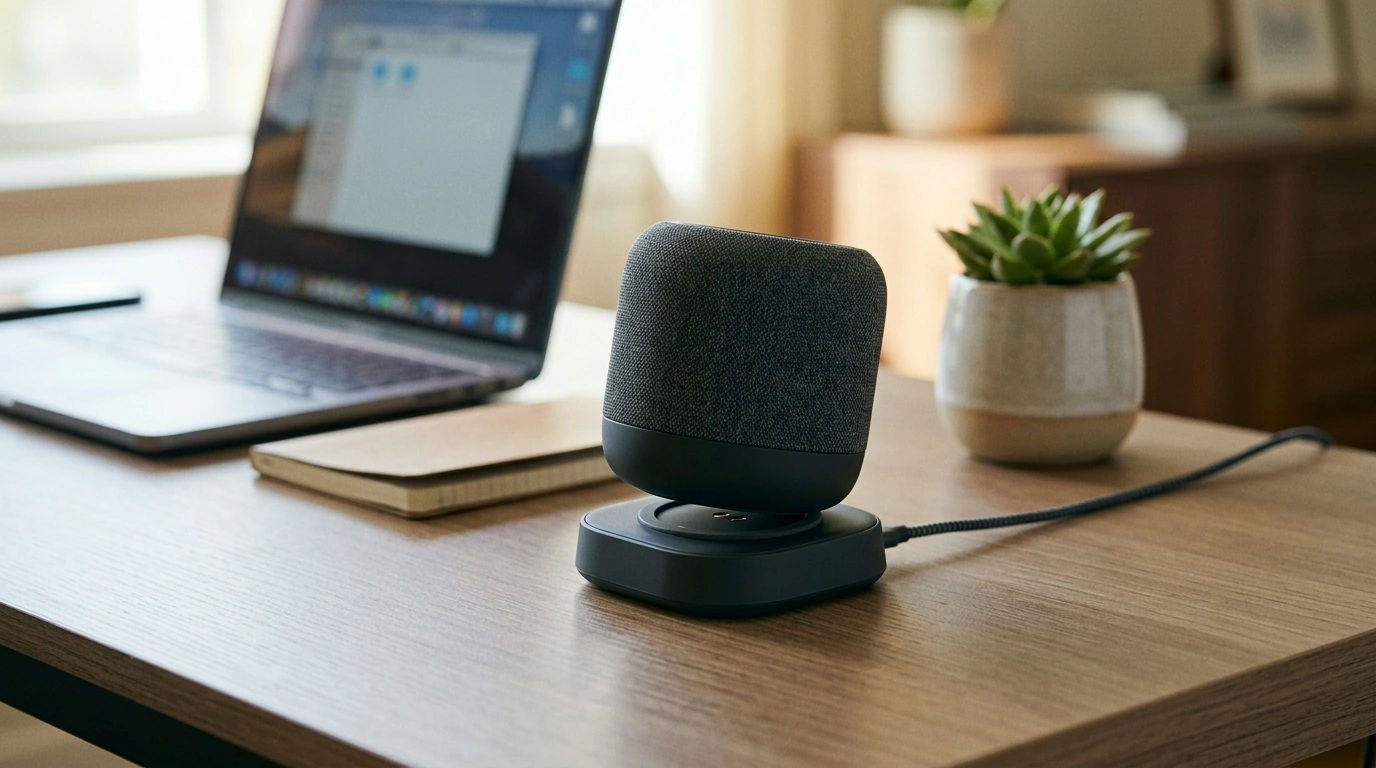
A charging dock keeps a Bluetooth speaker powered and ready while reducing cable clutter and connector wear. Instead of hunting for a cord every time the battery runs low, a dock turns charging into a simple habit: set the speaker down, see the indicator, and move on. Below are the practical differences between a dock and a loose cable, the everyday features that matter most, a compatibility checklist (with a quick table), and a setup routine that helps your speaker charge consistently at home, at a desk, or in a shared space.
What a charging dock does (and why it’s different from a loose cable)
A dock is more than a “cable holder.” It creates a stable parking spot so charging becomes automatic instead of a mini task you repeat daily. By reducing repeated plug-in/unplug cycles, it can also help protect the speaker’s charging port from wear, especially on devices that get topped off often.
Just as important, a dock keeps the speaker positioned neatly on a nightstand, kitchen counter, or office desk. That tidy placement makes “grab-and-go” easier: you set it down to charge when you arrive, then pick it up on the way out—without rerouting cords each time.
Everyday benefits to look for in a speaker charging dock
Small design details decide whether a dock feels effortless or finicky. Prioritize the basics that improve day-to-day reliability:
- Stable base: Resists tipping when you tap buttons, adjust volume, or bump the surface.
- Reliable contact: Charging should start predictably within a few seconds of docking.
- Compact footprint: Fits shelves, bedside tables, and narrow desk corners without wasting space.
- Usable controls while docked: You should still see indicator lights and reach key buttons without awkward angles.
- Simple power input: USB power is convenient because it works with standard wall adapters and many power banks.
If you want a straightforward “set it down and it charges” station, consider the Power Charging Dock for Bluetooth Speaker for a dedicated home base that keeps the speaker ready without cable sprawl.
Compatibility checklist before buying
Compatibility is the difference between a satisfying click-and-charge routine and a dock that only works when you fuss with it. Before purchasing, check these items carefully:
- Connector type: Confirm whether your speaker uses USB-C, Micro-USB, Lightning, or a proprietary interface.
- Speaker dimensions: The dock should support the speaker’s width and base shape without wobble.
- Port placement: The port must align with the dock connector without forcing the speaker to lean or twist.
- Case/skin fit: Thick silicone cases can prevent a snug fit or misalign the connector.
- Charging requirements: Verify the speaker’s typical input (voltage/current) and use an appropriate adapter.
Quick compatibility and setup checks
| Check | What to confirm | Why it matters |
|---|---|---|
| Charging connector | Matches the speaker’s port type and orientation | Prevents loose fit and intermittent charging |
| Speaker footprint | Base sits flat without rocking | Reduces drops and connector stress |
| Port alignment | No bending or forcing to connect | Avoids damage to the speaker port |
| Adapter rating | Use a reputable 5V USB adapter with adequate current | Improves charging stability and safety |
| Cable routing | Cable can route cleanly behind/under the dock | Keeps the setup tidy and reduces snagging |
Setup steps for reliable charging
A good dock still needs a sensible setup to prevent intermittent connections and accidental pulls. A dependable routine looks like this:
- Pick a stable spot: Place the dock on a level surface away from sink edges, stovetops, and high-traffic corners.
- Use a quality power source: Connect the dock to a reliable USB wall adapter or powered USB outlet. Avoid damaged cables or loose adapters.
- Seat the speaker gently: Set it down so the connector engages naturally; the charging indicator should appear within a few seconds.
- Test with and without a case: If the speaker wears a sleeve or skin, verify the connector still aligns without strain.
- Manage cable strain: Keep the cable route short and add slack/strain relief so a tug doesn’t yank the dock or speaker.
For background on connectors and fit tolerances, the USB-IF specification resources are a helpful reference: USB Type-C Cable and Connector Specification (USB-IF).
Safe charging habits for lithium-powered speakers
Most Bluetooth speakers use lithium-based batteries, which are safe when charged correctly but can be sensitive to heat and poor-quality power accessories.
For general safety guidance, see UL Solutions and battery care tips from Battery University.
Best places and routines that make a dock worth it
If you’re building a tidy charging/utility zone, small add-ons can help keep essentials in place—like a dedicated mount for your phone during commutes (see Universal Car Steering Wheel Phone Mount for Safe Navigation) and a compact personal-care extra for travel kits (see Triple-Sided Ultra-Fine Soft Bristle Toothbrush for Enhanced Oral Health).
Troubleshooting common charging issues
Care and longevity tips
When a charging dock is the right upgrade
FAQ
Will a charging dock charge a Bluetooth speaker faster than a cable?
Charging speed depends on the speaker’s charging circuitry and the power adapter’s output. A dock mainly improves convenience and connection consistency, so pairing it with a reputable adapter that matches your speaker’s requirements matters most.
Can a speaker stay on the charging dock all the time?
Many speakers manage charging automatically, but heat and continuous topping-off can affect long-term battery health. Keep the area ventilated, and unplug or remove the speaker if you notice excessive warmth.
What should be done if charging only works when the speaker is angled?
Stop using the dock in that state to avoid damaging the port. Check alignment, remove any case, clean the port, and inspect for bent connectors; if it persists, switch to another charging method until the hardware is repaired or replaced.
Recommended for you


Was this article helpful?
Yes
No









Leave a comment