-
Shop
- Advanced Technologies
- AI Skills for Creators & Freelancers
- AI Client Management
- AI Ethics
- AI Mindset
- AI Tools & Prompts
- AI Writing & Content Creation
- Audio, Voice & Music
- Design & Visual Creation
- Email, Messaging & Communication
- Freelancing & Business
- Marketing, Ads & Conversion
- Productivity, Workflow & Automation
- SEO & Search Optimization
- Social Media Content & Growth
- Strategy, Planning & Analytics
- Video Creation & Editing
- AI Skills Mastery 2026 Collection
- Bathroom
- Best-Sellers
- Car Accessories
- Confidence
- Dating & Social Skills
- Digital Resources
- Easter Products
- Education & Learning
- Family & Parenting
- Fashion
- Fashion Accessories
- Furniture
- Gadgets
- Health & Beauty
- Health & Wellness
- Home & Garden
- Home Electronics
- Home Supplies
- Jewelry
- Kids & Babies
- Kitchen
- Lighting
- Patio, Lawn & Garden
- Personal Growth
- Pet Care
- Pet Supplies
- Pets
- Shoes
- Smart Home Living Guides
- Sport & Outdoors
- Stress Relief & Relaxation
- Super Deals
- TikTok Growth & Monetization Mastery
- Travel
- Travel & Adventure
- Wealth
- Wellness
4K WiFi Body Camera: Night Vision, Motion Detection Tips

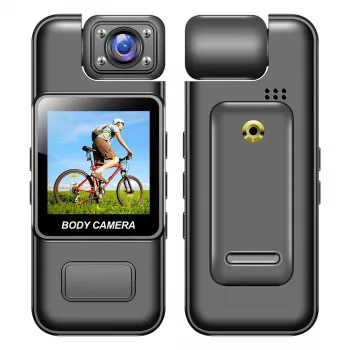
Ultra HD 4K WiFi Body Camera with Night Vision & Motion Detection: Everyday Recording Made Simple
A compact body camera can add clarity and confidence to daily routines—whether documenting deliveries, recording outdoor activities, or capturing incidents hands-free. A 4K WiFi body camera with night vision and motion detection is built for quick access and practical coverage, not studio-perfect cinematography. Knowing what these features do in real life (and where their limits are) helps you get cleaner footage, smarter clip organization, and fewer surprises after you hit record.
What This Body Camera Is Built For
Most people reach for a body camera when they want a hands-free record of what happened—without juggling a phone or worrying about missing a key moment. Typical scenarios include:
- Hands-free recording for walking, cycling, commuting, and personal documentation
- Event capture when quick access matters more than perfect framing
- Added visibility after dark with built-in night vision support
- Automatic recording triggers using motion detection for moments that happen unexpectedly
Think of it as a practical witness: small enough to wear, quick enough to start, and detailed enough to make faces, signage, and surrounding context easier to interpret than standard HD in many situations.
Key Features That Shape Real-World Results
Spec sheets can look similar across devices, but a few features change day-to-day usability in a big way:
- Ultra HD 4K recording: Helps capture sharper detail in faces, signage, and objects at moderate distances.
- WiFi connectivity: Useful for checking footage and transferring clips to a phone without removing the camera from its mount.
- Night vision assistance: Helps in low-light hallways, parking areas, porches, and evening walks.
- Motion detection: Can start recording when movement is detected, reducing empty footage and wasted storage.
- Compact form factor: Easier to carry daily and deploy quickly when needed.
Feature checklist to confirm before purchase
| Feature | Why it matters | What to look for in use |
|---|---|---|
| 4K video | Improves readability of details | Stable positioning to avoid motion blur |
| WiFi | Faster sharing and review | App pairing steps and transfer speed |
| Night vision | Better visibility after dark | Range depends on environment and reflectivity |
| Motion detection | Captures activity automatically | Sensitivity settings and false-trigger rate |
| Clip mounting | Hands-free operation | Secure clip that won’t rotate or slip |
Night Vision: Getting Clearer Footage After Dark
Night vision can make a meaningful difference, but it’s not magic—especially outdoors where distances are long and lighting is uneven. To improve results:
- Keep the camera steady: Night footage looks clearer when the camera is stable and pointed toward the subject, not drifting with each step.
- Avoid reflective targets: Shiny signs, glass, and reflective clothing can bounce light back and reduce usable detail.
- Watch for backlighting: Car headlights or strong porch lights can wash out faces and flatten contrast.
- Expect stronger indoor performance: Indoors often looks better because distances are shorter and lighting is more consistent.
- Add ambient light when possible: A small nearby light source can improve clarity more than relying entirely on night vision in open areas.
For evening walks or hallway checks, the best approach is often “steady, close, and evenly lit.” If you can reduce the distance to the subject and minimize harsh light sources, footage becomes more usable.
Motion Detection: When It Helps (and When It Doesn’t)
Motion detection can be a storage-saver and a convenience feature, but it’s most reliable when the camera itself isn’t constantly moving.
- Great for stationary setups: On a shelf, by a doorway, or set on a bag—motion can signal a meaningful event.
- Less reliable while worn: Walking, turning, and normal body movement may trigger constant recording.
- Practical combo: Use motion detection for monitoring and manual recording for walking or riding.
- Clip style matters: Some devices save separate clips per trigger, while others may create longer continuous files—choose the approach that fits your review habits.
If motion alerts are too sensitive, you’ll spend time sorting through unnecessary files. If they’re not sensitive enough, you may miss the moment that mattered. Sensible placement and a quick test run are often more effective than endlessly changing settings.
WiFi Transfers and Clip Management
Recording laws can vary by state and situation (especially for audio). For general background, review the FTC’s overview on recording conversations (Federal Trade Commission guidance) and the state-by-state consent summary from the NCSL (NCSL recording laws resource).
Setup Tips for Better Video and Audio
Common Use Cases and Practical Considerations
Product Snapshot: Ultra HD 4K WiFi Body Camera with Night Vision & Motion Detection
Ultra HD 4K WiFi Body Camera with Night Vision & Motion Detection
At-a-glance details
| Item | Details |
|---|---|
| Product | Ultra HD 4K WiFi Body Camera with Night Vision & Motion Detection |
| Price | $24.51 |
| Availability | In stock |
| Product page | View product |
Helpful Add-Ons for Daily Carry
- Universal Car Steering Wheel Phone Mount for Safe Navigation for hands-free maps and fewer distractions while driving.
- Armani Exchange Men’s Sneakers for comfortable walking and standing during longer shifts or city commutes.
FAQ
How far can night vision see on a small body camera?
Range depends on the environment, reflectivity, and how much ambient light is available. Indoor spaces often look clearer than open outdoor areas because subjects are closer and lighting is more consistent, and steadier positioning improves perceived detail.
Does motion detection work while wearing the camera?
It can, but normal walking and body movement may trigger constant recording. Motion detection is typically more useful for stationary monitoring, while manual recording tends to be more predictable for active wear.
Is WiFi fast enough for 4K video transfers?
WiFi is convenient for previewing and sharing a key clip, but large 4K files can take time to move. Trimming to only the needed segment and backing up important footage later can make transfers more manageable.
Recommended for you


Was this article helpful?
Yes
No









Leave a comment