-
Shop
- Advanced Technologies
- AI Skills for Creators & Freelancers
- AI Client Management
- AI Ethics
- AI Mindset
- AI Tools & Prompts
- AI Writing & Content Creation
- Audio, Voice & Music
- Design & Visual Creation
- Email, Messaging & Communication
- Freelancing & Business
- Marketing, Ads & Conversion
- Productivity, Workflow & Automation
- SEO & Search Optimization
- Social Media Content & Growth
- Strategy, Planning & Analytics
- Video Creation & Editing
- AI Skills Mastery 2026 Collection
- Bathroom
- Best-Sellers
- Car Accessories
- Confidence
- Dating & Social Skills
- Digital Resources
- Easter Products
- Education & Learning
- Family & Parenting
- Fashion
- Fashion Accessories
- Furniture
- Gadgets
- Health & Beauty
- Health & Wellness
- Home & Garden
- Home Electronics
- Home Supplies
- Jewelry
- Kids & Babies
- Kitchen
- Lighting
- Patio, Lawn & Garden
- Personal Growth
- Pet Care
- Pet Supplies
- Pets
- Shoes
- Smart Home Living Guides
- Sport & Outdoors
- Stress Relief & Relaxation
- Super Deals
- TikTok Growth & Monetization Mastery
- Travel
- Travel & Adventure
- Wealth
- Wellness
Charging a MacBook With a USB-C Charger: Is It Safe?
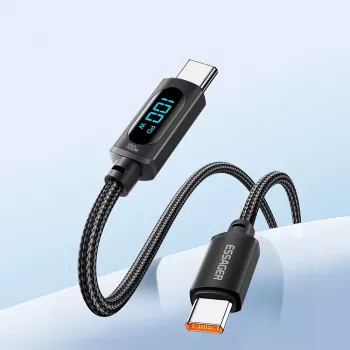
Is it okay to charge a MacBook with a USB-C charger?
Yes—charging a MacBook with a USB-C charger is generally safe and normal, as long as the charger and cable support USB Power Delivery (USB-PD) and can supply enough wattage for your specific MacBook model. Most modern MacBooks are designed to negotiate power over USB-C, meaning the laptop “asks” for the right voltage and current and the charger provides it.
What matters most: USB-PD and wattage
Not every USB-C charger is the same. A phone-focused USB-C brick might physically plug in but charge very slowly, pause under heavy use, or not charge at all. For reliable results, use a USB-PD charger with a wattage at or above what your MacBook expects (common Apple adapters are 30W, 61W/67W, 87W/96W, and 140W). A higher-watt USB-PD charger won’t “force” extra power—your MacBook will draw what it needs.
Don’t overlook the cable
The cable can be the bottleneck. For 60W charging, many USB-C to USB-C cables work fine, but for 100W (and higher) you’ll want a cable rated for that power level, ideally with an E-marker chip for proper negotiation. A low-quality or under-rated cable can lead to slow charging, excess heat, or intermittent disconnects.
When it’s not a good idea
Avoid no-name chargers that lack safety certifications and any charger/cable that gets unusually hot, smells like burning plastic, or causes repeated connect/disconnect behavior. Also, if you’re using a power-hungry workload, an underpowered charger may only maintain battery level or still drain slowly.
For practical guidance on choosing a properly rated USB-C to USB-C cable and understanding 100W USB-PD charging, see this detailed resource: https://ulorin.com/guide-100w-led-usb-c-to-usb-c-cable-pd-qc3-guide/.
FAQ
What wattage USB-C charger should I use for a MacBook?
Match or exceed the wattage your MacBook model is designed for (often 30W–140W). A higher-watt USB-PD charger is fine; the MacBook will only draw what it needs.
Recommended for you


Was this article helpful?
Yes
No









Leave a comment