-
Shop
- Advanced Technologies
- AI Skills for Creators & Freelancers
- AI Client Management
- AI Ethics
- AI Mindset
- AI Tools & Prompts
- AI Writing & Content Creation
- Audio, Voice & Music
- Design & Visual Creation
- Email, Messaging & Communication
- Freelancing & Business
- Marketing, Ads & Conversion
- Productivity, Workflow & Automation
- SEO & Search Optimization
- Social Media Content & Growth
- Strategy, Planning & Analytics
- Video Creation & Editing
- AI Skills Mastery 2026 Collection
- Bathroom
- Best-Sellers
- Car Accessories
- Confidence
- Dating & Social Skills
- Digital Resources
- Easter Products
- Education & Learning
- Family & Parenting
- Fashion
- Fashion Accessories
- Furniture
- Gadgets
- Health & Beauty
- Health & Wellness
- Home & Garden
- Home Electronics
- Home Supplies
- Jewelry
- Kids & Babies
- Kitchen
- Lighting
- Patio, Lawn & Garden
- Personal Growth
- Pet Care
- Pet Supplies
- Pets
- Shoes
- Smart Home Living Guides
- Sport & Outdoors
- Stress Relief & Relaxation
- Super Deals
- TikTok Growth & Monetization Mastery
- Travel
- Travel & Adventure
- Wealth
- Wellness
RGB Wired Gaming Headset: Noise-Cancel Mic + Controls
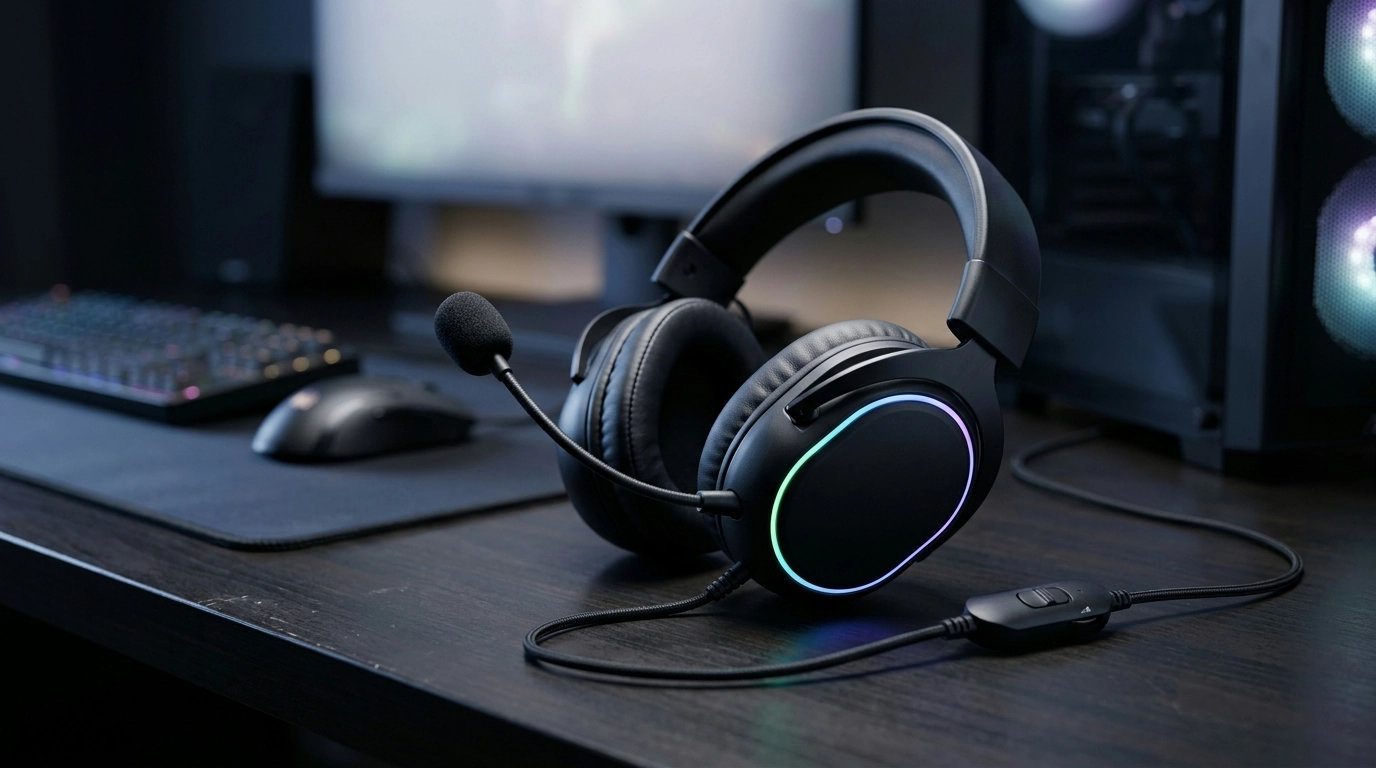
RGB Wired Gaming Headset with Noise-Canceling Mic and Button Controls
A wired gaming headset can be a practical upgrade for stable audio, low-latency chat, and plug-and-play reliability. This RGB wired model combines a noise-canceling microphone with on-headset button controls, making it easy to adjust volume or mute quickly during competitive matches, work calls, or late-night sessions when you want to keep your voice clear without waking the whole house.
If you’re shopping for a straightforward, budget-friendly option, take a look at the RGB Wired Gaming Headset with Noise-Canceling Mic and Button Controls.
Quick feature overview
- Wired connection for consistent audio with minimal dropouts
- Noise-canceling mic helps reduce background sounds for clearer voice chat
- Button controls on the headset for fast mute/volume adjustments (depending on configuration)
- RGB lighting for a classic gaming look at the desk or on stream
- Designed for gaming, voice chat, and everyday media
A wired headset keeps latency low and removes battery management from the equation. Pair that with quick-access controls and a noise-reducing mic, and you get an everyday setup that’s easy to live with—especially if you switch between games, Discord, and video meetings.
At-a-glance checklist
Use this checklist to confirm the headset fits the intended setup (PC, console, laptop, or mobile). If using a console controller or a laptop combo jack, confirm the plug type and whether a splitter/adapter is needed for separate mic and audio ports. For team chat, prioritize mic clarity and easy-to-reach mute over lighting features.
| Item to check | Why it matters | What to look for |
|---|---|---|
| Connector type | Determines whether it plugs in directly | 3.5 mm combo, dual 3.5 mm, or USB (lighting may be USB-powered) |
| Mic support on the device | Some ports carry audio only | A headset/mic icon on the port or controller |
| Inline/on-headset controls | Quick changes mid-game | Mute toggle, volume wheel/buttons, mode switch if present |
| Cable length and routing | Comfort and desk management | Enough reach to PC/console without strain |
| Platform audio settings | Ensures proper mic input/output selection | Correct default device and input level in system settings |
Sound performance for games and media
In games, “good sound” often means more than loud explosions. Directional cues—footsteps, reloads, ability casts, and distant movement—tend to sit in the mids and upper frequencies, while bass adds impact and atmosphere. The goal is a mix that stays exciting without burying details.
- Directional cues: Footsteps and positioning benefit from clean mids/highs and controlled bass so details aren’t masked.
- Immersion: Story-driven and cinematic titles often feel better with fuller low end and a sense of space.
- Competitive play: Separation and clarity help you pick out multiple sound sources at once.
- Wired advantage: Wired audio generally reduces latency compared to many wireless setups, which can help with rhythm games and fast reactions.
If the audio ever feels “muddy,” try reducing bass boost in your system EQ and slightly raising the upper mids where many voice lines and footstep transients sit. Small changes can make the mix easier to read without cranking the volume.
For troubleshooting system-side audio issues, Microsoft’s guidance can help with device selection and driver-related fixes: Fix sound or audio problems in Windows.
Noise-canceling mic: clearer comms in real rooms
Most people don’t play in a perfectly treated studio. A noise-canceling (noise-reducing) headset mic helps cut steady background sounds such as PC fans, air conditioning hum, and some keyboard chatter, so your voice comes through more clearly to teammates.
- Placement matters: Keep the mic a couple finger-widths from the corner of your mouth—close enough for volume, off-center enough to reduce plosives.
- Set the right input gain: Too low sounds distant; too high can clip and exaggerate breathing and room noise.
- Stack smart suppression: When available, pair the headset’s noise reduction with software suppression for cleaner output.
If you use Discord, its built-in Krisp feature is a popular option for reducing background noise during voice chat: Discord Support — Krisp Noise Suppression.
Button controls and RGB lighting in daily use
On-headset controls are all about speed: muting instantly during a clutch moment, lowering volume when a call comes in, or adjusting without tabbing out. The best approach is to identify each control during your first setup and practice locating it by touch so it becomes automatic.
Comfort, fit, and isolation
For general guidance on listening levels and healthier long-session habits, see the World Health Organization’s safe listening resources: World Health Organization — Safe listening.
Setup and troubleshooting basics
More in-stock picks
- Universal Car Steering Wheel Phone Mount for Safe Navigation
- Triple-Sided Ultra-Fine Soft Bristle Toothbrush for Enhanced Oral Health
FAQ
Will the microphone work on both PC and consoles?
It depends on the connector type and whether the device port supports a headset mic (for example, a TRRS combo jack on a controller or laptop). Some PCs need a splitter/adapter for separate mic and headphone ports, and consoles may require voice chat to be enabled in system settings.
How can the mic sound clearer during voice chat?
Position the mic near the corner of your mouth, set input gain so your normal voice is strong without clipping, and reduce obvious noise sources like fans. If available, enable noise suppression in your chat app to further cut background sound.
What should be checked if the headset audio works but the mic doesn’t?
Confirm the mic isn’t muted, select the correct input device in your system/chat app, and verify the port you’re using supports microphone input. If you’re on a PC with separate jacks, you may need a TRRS combo jack or a splitter; testing on another device can quickly narrow down whether it’s a settings issue or a connection mismatch.
Recommended for you
Was this article helpful?
Yes
No









Leave a comment